
← Blog ·
How to keep a track day logbook (without spreadsheets)
Track day logbook in plain English: what to capture per session, why spreadsheets break around session 8, and the season layer RaceChrono is missing.
If you do more than three or four track days a year, you have a logbook problem. You might not call it that yet — most people don’t, until the moment they need to look something up and can’t find it. Then you spend twenty minutes scrolling through old photos trying to remember which set of tires you were on at your home track in June, or what your hot pressures were the last time it rained.
This piece is the honest version of “how to keep a track day logbook” — what to capture per session, where the usual tools (Sheets, Notes, the RaceChrono app itself) stop scaling, and what I ended up using when mine did. Skip to the checklist if you just want the list.
The actual problem isn’t lap times — it’s where they live
By the end of one season my data looked like this:
- Lap times and session traces in RaceChrono (or a RaceBox export) on the phone.
- Tire pressures (cold and hot) in Apple Notes, one note per track day.
- Which tire set was on the car which day in a Google Sheet with three tabs.
- Setup notes — alignment, dampers, brake pads — in a different Apple Notes document because the first one got too long to scroll.
- Session video on YouTube (unlisted), with titles like “home track june 3 — sess 2”.
- Receipts for the next set of pads in Gmail.
Nothing in that list is wrong. Each tool does its one job well. The problem is that the question you ask at the end of a season — “what was I running last August and how did it go?” — needs four of them open at the same time.
This is the season-organisation problem. Lap timers solve the session. Spreadsheets solve a small number of structured rows. Notes apps solve free-form text. None of them holds a season.
Why spreadsheets break around session 8
The Sheet works for the first few track days because you can keep the whole season in your head. You glance at the row, remember the day, fill in the gaps.
Around session eight it stops working. Usually all at once:
- You forget which tire set is which — there are now four pairs in the garage and the tab listing them is on the other sheet.
- A column you added halfway through (rear toe, say) is empty for the first six rows because the data isn’t anywhere — you took alignment notes in a WhatsApp message to your tuner.
- You start using the “Notes” column as a dumping ground, and now it has the alignment, weather, brake pad observation, and a reminder to check rotor thickness — all stuffed into one cell.
- Your phone keyboard makes typing on the Sheet at the track miserable, so you don’t, so the row is half-filled by Monday and you reconstruct from memory. Memory loses to whatever you wrote down the same day.
None of this means a Sheet is the wrong tool. It just means it isn’t a logbook; it’s a row store. A logbook is the thing that links a session, the laps in it, the setup the car was on, the consumables you wore, and the notes you wrote — all on the same surface, all retrievable a year later.
And then you sell the car
The other moment a logbook becomes obvious is the day you let the car go. I sold a Golf R after several track seasons with it, and I’m waiting on a GTI 50 to replace it. What I wanted on the day the Golf R sold, and didn’t have, was a single archive of that car’s track life: every day it ran, every lap time, every set of pads I tried, what tire pressures actually held up in heat. Some of it I could reconstruct from receipts and old phone notes. Most of it I just lost.
The pads example is the one I miss most. The stock OEMs gave up early — fine, that’s not news for an R on track. The part I cared about was which aftermarket sets I tried after, on which tracks, in what temperatures, and which one I’d actually buy again. That decision lives in the intersection of the car, the track, and how you drive it — and no single receipt, photo or phone note holds all three together. A logbook does, by virtue of being the one place each session writes to.
One way to frame what’s actually at stake: a season on track costs real money. Entries, tires, pads, fuel, travel — engaged amateurs spend somewhere between a few thousand and the better part of five figures a year. The lap times you set and the setup decisions that came out of that spend are, more or less, what you have to show for it. They are also uniquely yours — to you as a driver, to your specific car, on the tracks you actually run. Nobody else’s notes substitute. Lose the record and you lose the knowledge.
This is a worse failure mode than mid-season chaos because there’s no fixing it later. The car is gone; the context goes with it. A logbook avoids this by accident — if every day is in one place while you own the car, the archive is already done the day you hand over the keys, and it’s ready to sit next to whatever replaces it.
What a track day logbook should actually capture
The minimum that survives one off-season:
- The session itself. Date, track, weather, car. Not a deep analysis layer — just enough metadata that the session is findable later.
- Laps and best lap. Per session, not aggregated. “My PB at this circuit in 2026” is one query; “my best lap of that day” is a different question and most days you want the second one.
- The setup the car was on for that session. Pressures hot and cold, alignment if you change it, tire compound, pads, sway bar setting if you bother. The point isn’t to publish it — it’s to find it next year.
- Consumables. Which tire set, how many laps it has, when the pads went on. The boring question that quietly becomes expensive if you stop tracking it.
- Notes. Free text. Anything that doesn’t fit a column: how the rear felt in T3, that the pads squealed for the first lap of the second session, that the air went up 4 psi in the rears in the heat.
- Video. A link is enough. The logbook doesn’t have to host it.
This is the spine. Everything else — tagging, weather APIs, video timestamps synced to laps — is a feature, not the spine. If your logbook captures the six items above for every session and you can find them a year later, you have a logbook. Most people don’t.
A word on what a logbook does not do
A logbook tells you what you ran and how you went. It does not tell you why you got faster. If you change the rear tire and shave half a second off, the logbook records both facts. The causal link is in your head — driver familiarity, track temperature, the fact you finally got T7 right, your tire choice. Confusing “captured” with “caused” is the classic mistake; a good logbook makes the data retrievable so you can reason about it. It doesn’t do the reasoning.
What I ended up using
For most of last season I held the line on Sheets + Notes + RaceChrono. By August I was reconstructing tire pressures from memory and giving up on whose pads were whose. I started building ApexLog — the thing you’re reading the blog of — because nothing in the existing market filled this gap. RaceChrono captures the session; ApexLog keeps the season.
What that looks like in practice, end-to-end:
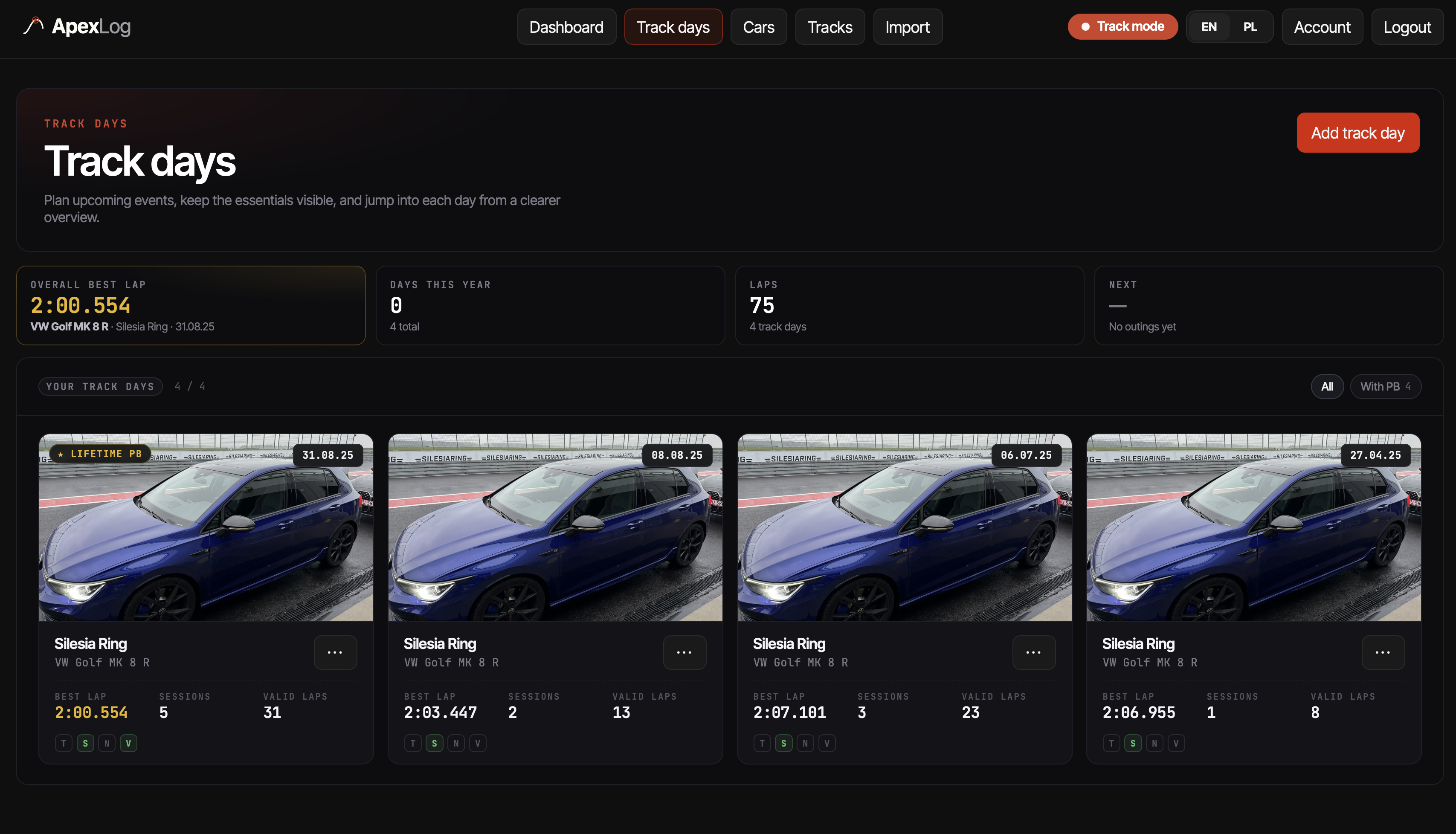
The track day list is the top of the hierarchy. Adding a day takes a date, a track and a car — you can fill the rest in later or never. Sessions live underneath; laps live underneath sessions. The structure matches how you’d draw it on paper.
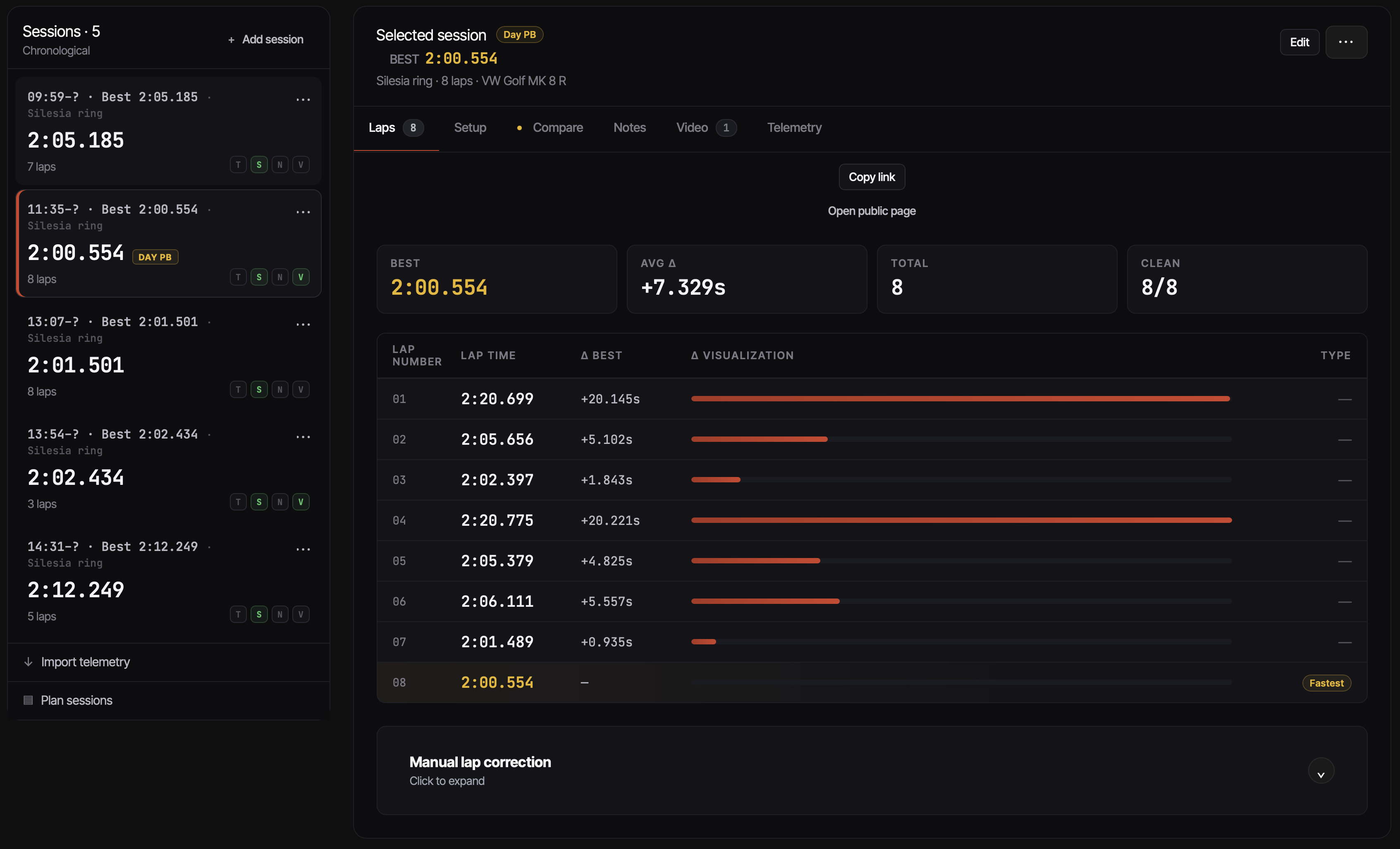
Laps come in from a RaceChrono .rcz export, a RaceChrono CSV v3 export, or a
RaceBox CSV — drop the file, ApexLog parses the sessions and laps out, and
they attach to the right day. The RaceChrono import page
walks through that flow specifically (and has a sample file if you want to see
the result without uploading your own); RaceBox owners have an equivalent
page. A follow-up post will get into what to do with RaceChrono’s CSV export
beyond just importing it.
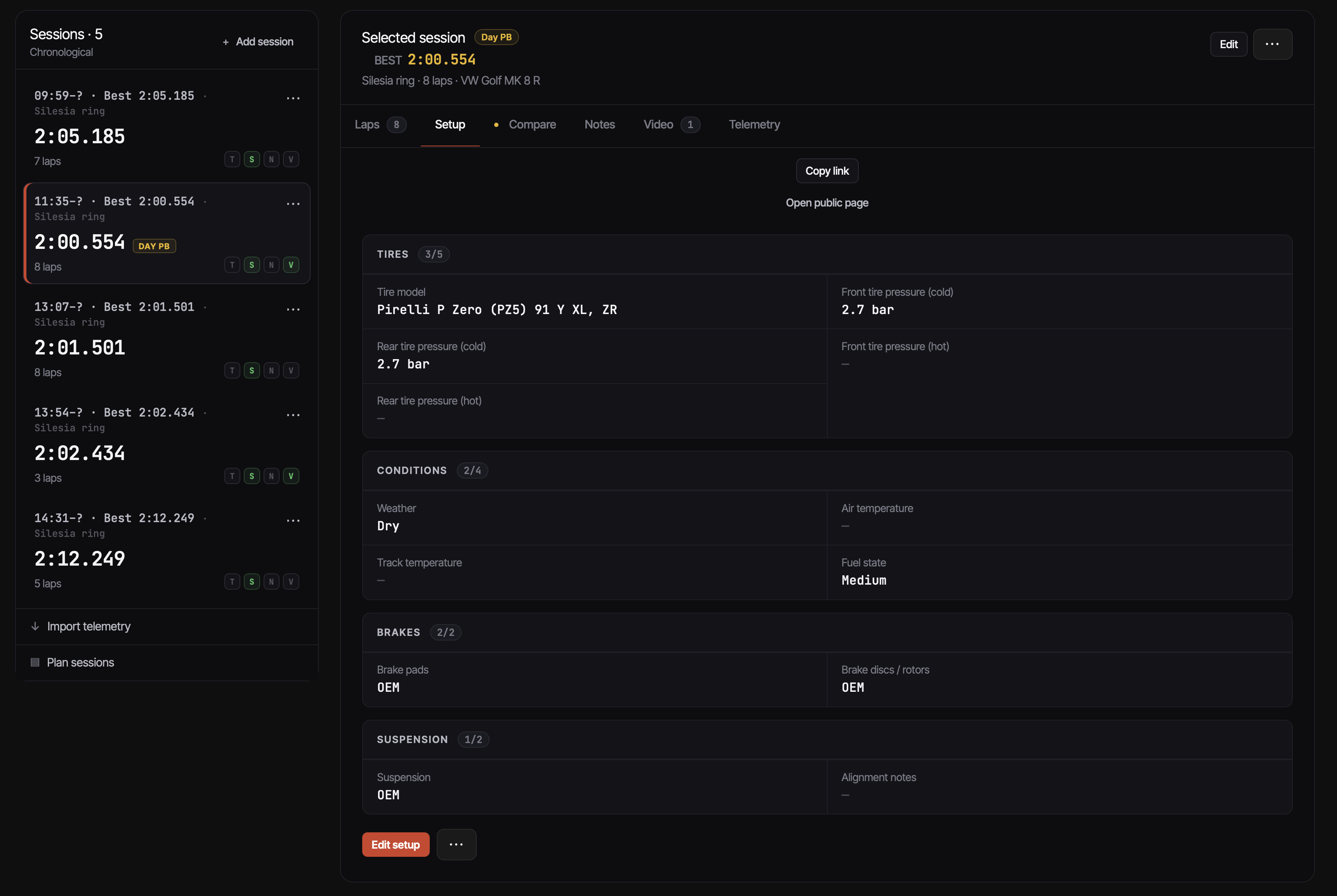
Setups attach to the day, not the session, because in practice you don’t change geometry between sessions — you change pressures, and pressures live on the setup card. Consumables (tire sets, pad sets, disc sets) attach to the car and accumulate mileage as you record sessions; the next time pads need replacing, the number is in one place rather than reconstructed from receipts. Track mileage rolls up the same way at the car level — you don’t enter laps by hand, so “how many track miles on this car?” has an actual number rather than a guess.
That’s the honest scope. There is a telemetry view with a racing-line map for imported sessions today, and more analysis on top of the imported data is where this side of the product goes next — the leverage is in looking at the telemetry next to the setup the car was on, the linked video and the rest of the season, not in producing more telemetry. What is firmly out of scope is the recording side — reading GPS off your phone, capturing in-car video. RaceChrono and RaceBox already do that part well, and there is no good reason to rebuild what they ship.
There are no AI insights about why a lap got faster, because I don’t think a logbook should pretend to know. What it does do is hold one car’s track context in one place: sessions, laps, setups, consumables, notes — all together, retrievable mid-season and still there the day you sell the car.
Try it on your own data
If you have a .rcz, RaceChrono CSV v3, or RaceBox CSV file from last
weekend, the fastest way to see whether this shape works for you is to drop
it in.
Start a logbook with ApexLog →
It’s free to try; the paid tier exists but the free one is enough to import a season and decide whether the format works for the way you actually keep notes.
This is the first post in a short series. Up next: what to do with your RaceChrono data after the session — exports, the .rcz vs CSV v3 difference, and what the data is actually good for once the session is over.